Pick Up Time :
Get a $5 credit or a free drink if order not ready on pick up time.
Delivery:
Next Day Dispatch - Order within 5hrs and 30mins
Please enter a valid email address
By clicking 'Notify Me', you agree to our Terms & Conditions and consent to receive email updates. You can unsubscribe at any time.
Add to Wishlist
Your store is set to:
Dandenong South store renovation
Our Dandenong South store is currently undergoing renovations. Your order will be processed and available for pickup at our nearby Mulgrave Store.
Glenorchy store renovation
Glenorchy is closed for renovation, Please choose Post Delivery for your area.
Stock is different at each store. To secure your item, order online. Walk-ins are still welcome but stock isn’t guaranteed.
Our team is ready to help! Please contact us if you have any questions about product specifications, stock availability, or compatibility.
SPECIFICATIONS:
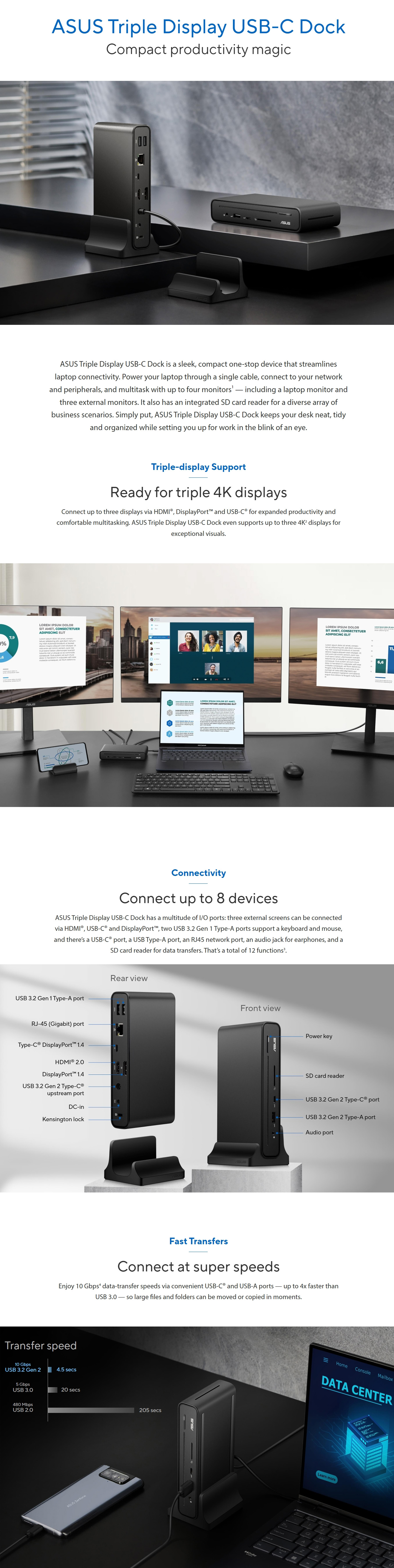
I/O Ports
1 x RJ-45 (Gigabit) port
2 x USB 3.2 Gen1 Type-A ports (5Gbps)
1 x 3.5mm audio combo jack
1 x USB 3.2 Gen2 Type-A port (10Gbps/5.0V2.4A)
1 x USB 3.2 Gen2 Type-C® port (10Gbps/5.0V 3.0A)
1 x SD card reader
1 x USB 3.2 Gen2 Type-C® port (DP1.4 only)
1 x HDMIâ„¢ 2.0 port
1 x DisplayPort 1.4 port
1x Kensington lock
1x Power button with indicator LED
1x DC jack(4.5 phi)
Video Resolution
HDMI Single Ext. Output: 3840×2160@60Hz
Display Port Single Ext. Output: 3840×2160@60Hz
USB-C Single Ext. Output: 3840×2160@60Hz
OS Support
Windows® 10 or above
Mac OS 13 or later
Power Adapter
150W DC20.0V / 7.5A
Secutiry
Kensington lock
Cable Length
65cm
Color
Black
Weight
Dock:514g±5g
Stand:95g±5g
Dimensions
160 x 80 x 32 mm
Material
Plastic, Metal
Package Contents
ASUS Triple Display USB-C Dock, docking stand, 150W adapter, power cord, user manual, warranty card
Power button
For ExperBook B series,
One key operation (Press the power-button to wake up your laptop with multiple monitors during standby mode).
For Other Windows Notebook (ASUS and Non-ASUS),
Press the power-button can turn on/off LED and open/shot down DC300’sdisplay signal.
Indicator LEDs
Please refer manual for "Indicator LEDs" actions.